
Next article

🌱 Your Feed Just Got More Alive. Literally

Mirror App video autoplay update

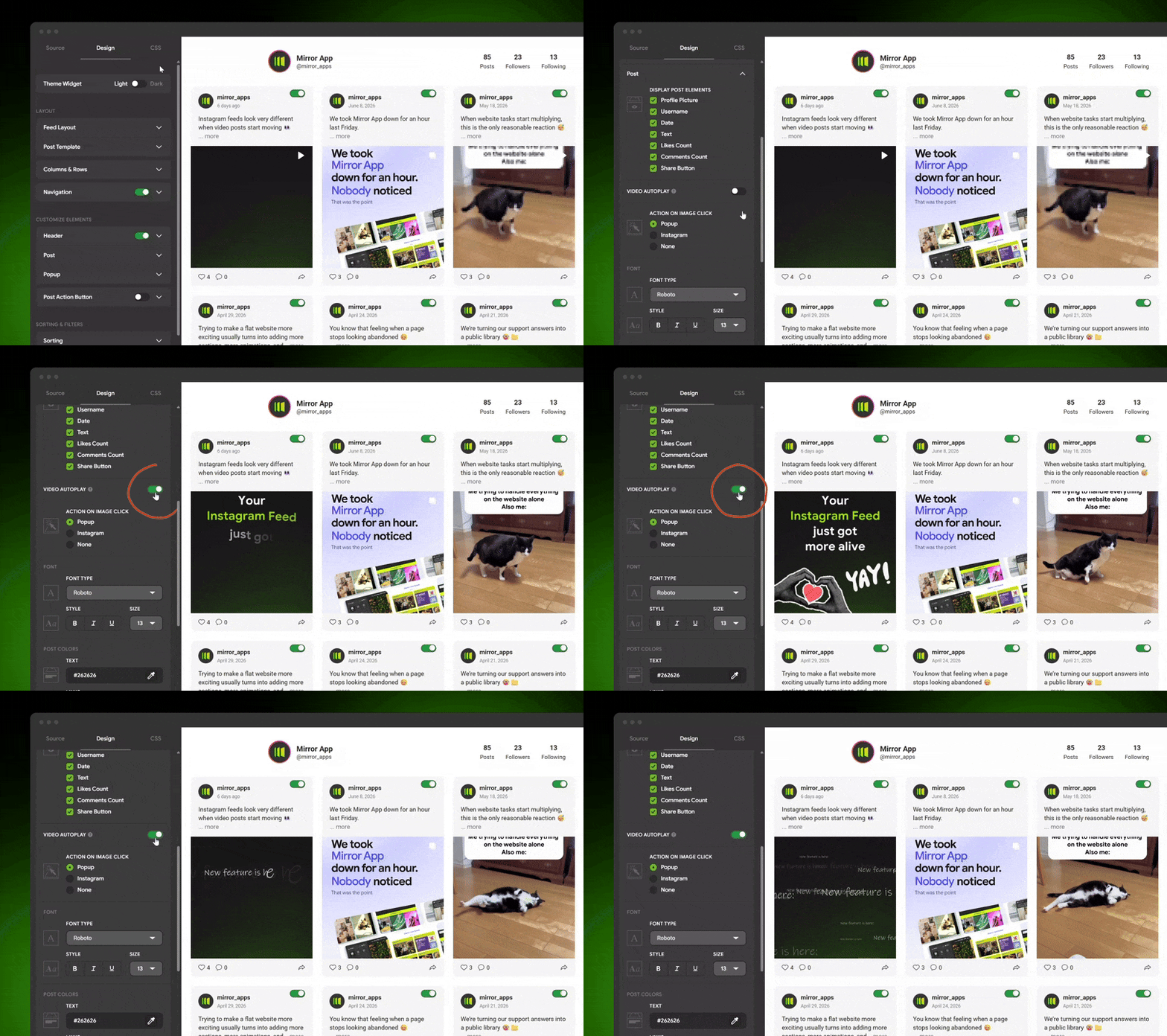
Videos in your widget now play automatically 🎉

When a visitor scrolls to the widget on your site, videos start playing on their own. Reels, clips, LinkedIn videos — everything kicks in the moment the feed comes into view.

It's called Video Autoplay. It's one toggle.
__wf_reserved_decorative

📍 Where It Works

Video Autoplay is available for:

  • Instagram Feed
  • Facebook Feed
  • LinkedIn Feed
  • Social Feed

🛠️ How to Turn It On

  1. Open your widget editor
  2. Go to Design → Post section
  3. Enable the Video Autoplay toggle.

That's it.

One thing that's easy to miss: don't forget to hit Publish. Changes only go live on your site after publishing — it's easy to overlook when you're adjusting settings inside the editor 😅

☝️ Why It Matters

A static feed asks visitors to stop and look.
A feed with autoplay doesn't wait for that decision — it starts telling the story on its own.

If your brand publishes Reels, video content, or LinkedIn clips, this changes how the widget feels on your site.
Less gallery, more presence.

🚀 Turn it on, hit Publish — and see the difference

Share

FAQ

What does Video Autoplay do?

It lets supported videos start playing when the widget enters the visitor's view. Playback can still depend on the visitor's browser and device settings.

Where is the setting?

In the widget editor, open Design, then Post, and enable Video Autoplay. The article says to publish the widget changes before expecting them to appear on the website.

Which feeds does this announcement cover?

The article lists Instagram Feed, Facebook Feed, LinkedIn Feed and Social Feed. Check the current editor for the options available to the widget and source you use.

Why might a video not autoplay?

Check that Video Autoplay is enabled and the widget changes have been published. Browser or device playback restrictions can also affect autoplay, so test the feed on the device where the problem occurs and check whether manual playback works.

Other Articles

Bring your social content to your website.

Create beautiful social media and reviews widgets for your website.

Create your first widget